
Video editing costs anywhere from $25 to $150+ per hour for freelancers and $100 to $250 per hour through an agency. On a per-project basis, expect to pay $300 to $1,500+, depending on video type, length, and complexity.
Those ranges are wide because “video editing” covers everything from cutting a 30-second TikTok clip to color grading a documentary. The cost depends on what you need edited, who does it, and how fast you need it back.
This guide breaks down current rates by experience level, project type, and pricing model so you can budget accurately before hiring.
Key Takeaways
- Freelance video editors charge $25-$150+ per hour, depending on experience, with entry-level editors starting around $20-$45/hour
- Project rates range from $50 for a TikTok edit to $15,000+ for a documentary, with YouTube videos landing at $300-$1,500 per video
- Agency editing runs $100-$250/hour, 2-3x freelance rates, but includes project management, color grading, and full post-production
- Rush delivery, revision rounds, and motion graphics are the biggest cost multipliers
- In-house editors cost $51,000-$93,000 per year before equipment, software, and benefits
Content
How Much Does a Video Editor Cost? (Quick Answer)

Freelance video editors in the United States charge between $25 and $150+ per hour in 2026. Agencies charge $100 to $250 per hour. Project-based pricing ranges from $300 to $1,500+ per video, depending on type and complexity.
For context, the U.S. Bureau of Labor Statistics reports a median annual wage of $70,980 for film and video editors. Glassdoor salary data shows a broader range of $51,000 to $93,000 per year for full-time positions.
These numbers give you the salary benchmark. But most businesses don’t hire full-time. They hire freelancers, agencies, or production partners on a per-project or monthly basis. The rest of this guide covers those models in detail.
For a broader breakdown of video production costs beyond just editing, see our full production cost guide.
Video Editor Hourly Rates by Experience Level
Entry-level video editors charge $20 to $45 per hour and handle basic cuts, sequencing, and simple transitions. Rates climb with specialization. An editor who knows After Effects, color grading, or 3D compositing commands significantly more than one who only cuts footage in Premiere Pro.
| Experience Level | Hourly Rate | Typical Work | Software |
|---|---|---|---|
| Entry-level | $20-$45/hr | Basic cuts, vlogs, simple social clips | Premiere Pro, Final Cut Pro |
| Mid-level | $45-$85/hr | Color grading, motion graphics, multi-cam | Premiere Pro, DaVinci Resolve, After Effects |
| Senior/Expert | $85-$150+/hr | VFX, advanced storytelling, broadcast | After Effects, Cinema 4D, DaVinci Resolve |
| Agency | $100-$250/hr | Full post-production with project management | Full suite |
A few notes on these ranges:
Entry-level editors ($20-$45/hr) are fine for straightforward work: podcast episodes, talking-head vlogs, and simple social clips. The footage comes in clean. The edit is mostly cutting and sequencing.
Mid-level editors ($45-$85/hr) handle color correction, basic motion graphics, multi-camera shoots, and branded content. This is where most businesses should start. The price reflects both technical skill and the ability to match a brand’s visual style.
Senior editors ($85-$150+/hr) work on broadcast, high-end brand campaigns, and projects involving VFX or complex compositing. At this tier, you’re paying for creative judgment as much as technical skill.
Agency rates ($100-$250/hr) include more than just the editor. You’re paying for a project manager, quality assurance, and usually access to a full post-production team (colorist, sound designer, motion artist). The per-hour rate is higher, but the per-project total can be comparable to hiring multiple freelancers.
See our guide on how much videographers charge for rates on the filming side.
Download the State of Creative in Tech report to see how B2B brands are budgeting for creative production in 2026.
Video Editing Costs by Project Type
A TikTok edit might cost $50. A documentary can run $15,000+. The project type is the single biggest factor in total editing cost because it determines the footage volume, complexity of edits, and deliverable count.
| Project Type | Cost Range | Per-Minute Rate | Typical Turnaround |
|---|---|---|---|
| TikTok / Reels | $50-$400 | $10-$50/min | 1-2 days |
| YouTube (long-form) | $300-$1,500 | $20-$100/min | 3-5 days |
| Corporate / Brand | $400-$2,000 | $30-$150/min | 5-10 days |
| Ad Creative (paid social/display) | $250-$1,200 | $25-$100/min | 2-5 days |
| Event Highlights | $500-$2,500 | $15-$75/min | 5-7 days |
| Explainer / Motion Graphics | $800-$3,000 | $50-$200/min | 7-14 days |
| Documentary | $3,000-$15,000+ | $100-$500/min | 2-8 weeks |
Short-form social content (TikTok, Reels, YouTube Shorts) is the cheapest to edit because the videos are under 60 seconds and the editing style is fast cuts, text overlays, and trending audio. Many editors price these per clip, not per hour.
YouTube long-form is the most common project type buyers ask about. For a 10-to-20-minute video, expect $300 to $1,500, depending on editing complexity. A talking-head video with b-roll costs less than a heavily edited video essay with custom graphics and animations.
Corporate and brand videos cost more because they require brand guideline adherence, stakeholder review cycles, and often include elements like lower thirds, logo animations, and licensed music. Corporate video costs break down further by format (training, testimonial, product demo).
Explainer and motion graphics sit at the higher end because every frame is built, not captured. An animated explainer video involves illustration, animation, voiceover, and sound design. See our breakdown of animation costs for the full picture.
For social media video costs specifically, we cover platform-by-platform budgets in a separate guide. And if you’re budgeting a 30-second commercial, the cost structure changes significantly with broadcast licensing.
Get a free competitive creative analysis with our Creative Intelligence Report. We analyze 12 areas of your brand’s creative compared to competitors, delivered in 48 hours.
Hourly vs Project-Based Pricing: Which Is Better?
Hourly pricing protects editors. Project-based pricing protects buyers. The right model depends on how well you can define the scope before work starts.
Hourly works best when:
- The scope is unclear or likely to change
- You need ongoing editing support (weekly content, recurring series)
- The project involves heavy revision rounds or client feedback loops
Project-based works best when:
- The deliverable is clearly defined (one YouTube video, three ad variations)
- You want cost certainty before committing
- The editor has done similar work before and can estimate accurately
The catch with hourly: a slow editor costs you more than a fast one for the same output. The catch with project-based: if the scope creeps, editors either absorb the extra work (and resent it) or charge overages.
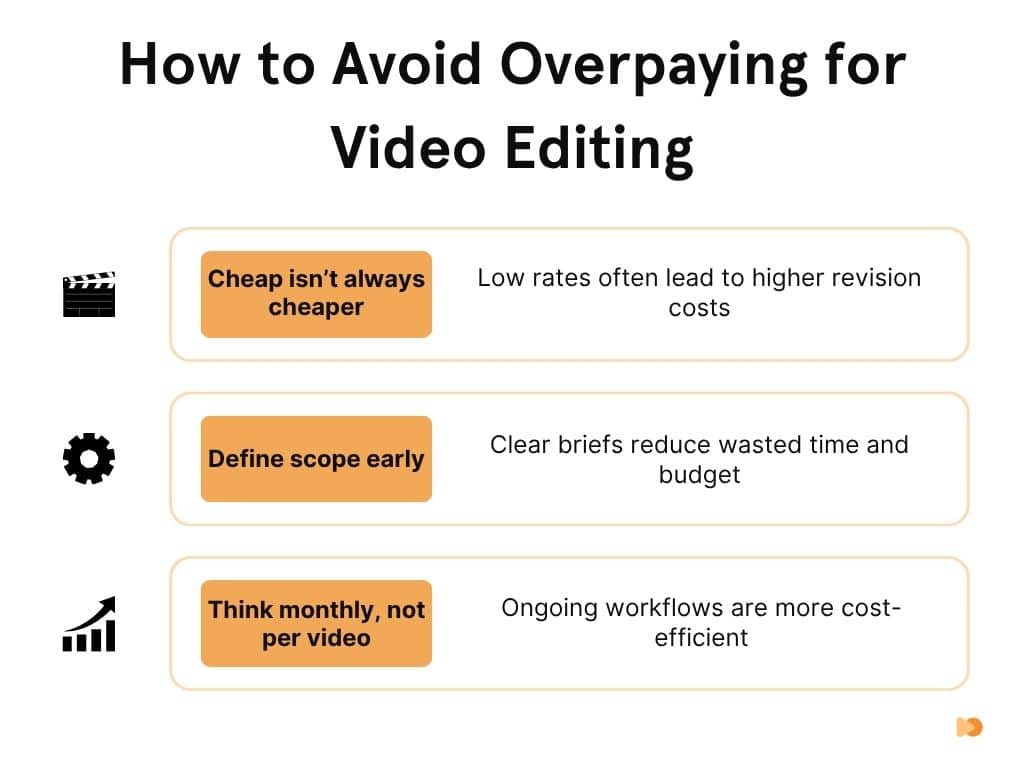
A third option is retainer or subscription pricing, where you pay a flat monthly fee for a set volume of work. This model works best for teams publishing consistently. It gives you cost certainty without the scope debates of per-project pricing.
What Drives Video Editing Costs Up (or Down)

Complexity is the biggest cost driver. A jump cut on a talking-head video takes minutes. Compositing a green screen with motion-tracked 3D elements takes days. Six factors move the price most:
1. Edit complexity and VFX. Basic cuts and transitions are cheap. Motion graphics, color grading, VFX compositing, and 3D animation each add cost. An editor who works in After Effects or Cinema 4D charges 2-3x what a cuts-only editor charges.
2. Turnaround time. Rush jobs typically carry a premium. Multiple rate guides cite 25-50% surcharges for expedited delivery. A corporate video that normally takes 10 days but needs to ship in 3 will cost significantly more.
3. Revision rounds. Most editors include 2-3 revision rounds in their quote. Beyond that, expect $50-$200+ per additional round depending on the editor’s tier. One YouTube creator documented how revision management became the biggest hidden cost of outsourcing editing.
4. Software expertise. Editors who work in specialized software (DaVinci Resolve for color grading, Cinema 4D for 3D, Houdini for VFX) charge more than generalists. The tool reflects the skill depth.
5. Footage quality. Bad footage creates more work. Shaky handheld shots need stabilization. Poor audio needs cleanup or re-recording. Unorganized file delivery adds hours of sorting. Clean, well-shot footage keeps editing costs down.
6. Geographic location. Editors in New York and Los Angeles typically charge more than the national average due to higher cost of living. Offshore editors in Southeast Asia or Eastern Europe advertise rates as low as $10-$25/hour, but buyers on Reddit and editing forums consistently report that communication gaps and time zone mismatches offset the savings.
Use our video production cost calculator to estimate your total project cost based on these factors.
Freelance vs Agency vs In-House vs Subscription
There are four ways to pay for video editing, and each one makes sense for a different type of buyer. The choice depends on your volume, budget, and how much you want to manage.
| Model | Cost | Best For | Tradeoff |
|---|---|---|---|
| Freelance | $20-$150/hr | One-off projects, budget-conscious teams | Quality varies, you manage everything |
| Agency | $100-$250/hr | Scaling teams, complex post-production | Higher cost, but turnkey delivery |
| In-house | $51K-$93K/yr + overhead | Daily editing needs, brand consistency | Fixed cost regardless of output |
| Subscription | $5,000+/mo | Ongoing content at scale | Requires monthly commitment |
Freelancers are the most flexible option. Hire per project on platforms like Upwork or Fiverr, pay only for what you use, and scale up or down as needed. The downside: quality is inconsistent, and you spend time managing the editor, reviewing cuts, and giving feedback. Buyers on Reddit editing forums consistently report that editors under $20/hour produce work requiring so many revision rounds that the total cost exceeds what a mid-tier editor would have charged upfront.
Agencies charge more per hour but deliver a managed experience. An account manager handles communication, a team handles different aspects of post-production, and quality control is built in. If you’re producing 8+ videos per month and don’t want to micromanage every cut, agencies make the math work.
In-house hires cost $51,000 to $93,000 per year in salary alone. On top of that, expect equipment costs (workstation, monitors, storage) and software licenses (Adobe Creative Cloud runs roughly $660/year per seat). At lower production volumes, outsourcing is typically cheaper than a full-time salary plus overhead.
Subscription or production partner models charge a flat monthly fee that covers strategy, production, and editing under one roof. We operate this way. Our monthly plans cover video post-production, motion graphics, ad creative, and social content under one subscription. The template systems we build for each brand reduce per-asset cost over time, because every project feeds a reusable library instead of starting from scratch. With 2,000+ campaigns produced across 920+ brands, including Square, Spotify, and NinjaOne, the model works best for B2B teams producing content every month.
For a direct comparison of working with a production partner versus hiring independently, see our Vidico vs freelancers breakdown. And for more on video retainer packages, we cover how subscription pricing works in detail.
Ready to build a video strategy that scales? Get a free video marketing plan tailored to your goals, channels, and budget.
Hidden Costs Most Buyers Miss
The editor’s invoice is only part of the total cost. Revision management, onboarding, and quality failures regularly push total spend well past the initial quote.
Revision rounds beyond scope. Most quotes include 2-3 rounds. But if feedback is vague or stakeholders pile on late changes, rounds multiply. Each additional round costs $50-$200+ and adds days to the timeline.
Communication and project management. Writing briefs, reviewing cuts, giving timestamped feedback, and coordinating between stakeholders takes hours. If you’re managing a freelancer yourself, that’s your time (or your team’s) being consumed.
Onboarding new editors. Every new editor needs to learn your brand guidelines, tone, pacing preferences, and approval workflow. The first 2-3 projects are almost always slower and more expensive than ongoing work with the same editor. Switching editors often resets this clock.
Quality redo costs. Cheap editing that misses the mark costs twice: once to produce, once to fix or redo. Forum threads are full of buyers who hired at $15/hour, received unusable work, and ended up paying $50+/hour to get it corrected.
Stock footage and music licensing. Some editors include stock assets in their rate. Many don’t. A single licensed music track can cost $15 to $500 depending on the library and usage rights. Budget for this separately unless your quote explicitly includes it.
The most reliable way to reduce hidden costs is to work with the same editor or team consistently. Familiarity with your brand eliminates the onboarding tax and reduces revision cycles. See our guide on outsourcing video production for a framework on managing external editors.
How to Budget for Video Editing
Start with your publishing cadence and work backward. Your monthly editing budget depends on how many videos you produce, what type they are, and who does the editing.
| Business Type | Monthly Need | Budget Range |
|---|---|---|
| Social-first brand | 8-12 short clips/month | $200-$500/month |
| YouTube channel | 4-8 long-form videos/month | $1,200-$6,000/month |
| B2B brand campaigns | 2-4 brand/corporate videos/month | $1,500-$5,000/month |
| Enterprise / broadcast | Ongoing production pipeline | $5,000+/month |
Budgeting formula: (estimated hours x editor hourly rate) + add-ons (stock assets, music, captions) + 15-20% revision buffer.
For a YouTube channel producing four 15-minute videos per month using a mid-level freelance editor ($50/hr), that’s roughly:
- 8 hours of editing per video x $50/hr = $400/video
- 4 videos x $400 = $1,600/month
- Add 15% revision buffer = $1,840/month
If that same team switched to a subscription model, the cost becomes fixed and predictable, and the per-video rate typically drops over time as the editor (or team) builds familiarity with the brand.
Frequently Asked Questions
How much does a 1-minute video edit cost?
A 1-minute video edit costs $10 to $200+ depending on the content type. A simple social media clip (cuts and text overlays) runs $10 to $50 per finished minute. A polished corporate or explainer video with motion graphics runs $50 to $200+ per finished minute. The per-minute rate reflects editing complexity, not video length alone.
How much should I pay for 30 minutes of video editing?
For 30 minutes of an editor’s time, expect to pay $10 to $75 at entry level, $22 to $42 at mid-level, and $42 to $75+ at senior level. But “30 minutes of editing” rarely produces a finished video. A 5-minute YouTube video typically requires 4 to 8 hours of editing time. Budget based on the deliverable, not editing minutes.
Can AI tools replace a professional video editor?
AI editing tools handle basic tasks like auto-captioning, clip trimming, and b-roll suggestions for $5 to $60 per month. Tools like Descript, CapCut, and Opus Clip work well for rough cuts and simple social content. They cannot replicate creative storytelling, brand-consistent pacing, complex VFX, or the editorial judgment that turns footage into a finished piece. AI works as a complement to reduce repetitive tasks, not as a replacement for professional editing on brand or campaign content.
The Bottom Line
Video editing costs depend on three things: who does the work, what type of video it is, and how complex the edit needs to be. Freelancers start at $20/hour for basic cuts. Agencies charge $100-$250/hour for managed post-production. Project rates range from $50 for a social clip to $15,000+ for a documentary.
Buyers who hire at the lowest rate often spend more in total once revision rounds, onboarding time, and quality redo costs are factored in. For brands producing content every month, a subscription or retainer model reduces per-asset cost over time by building reusable templates and brand assets that make every project faster than the last.
Vidico’s subscription model covers explainer, motion graphics, ad creative, and social under one monthly fee, with 2,000+ campaigns delivered for brands like Square, Spotify, and NinjaOne. If you’re producing video regularly and want cost certainty without sacrificing quality, book a free strategy session to see what a production partnership looks like.